Electronics -- USB-FX2 Board: Software
My software collection includes tools and examples for testing the USB-FX2 board and understanding how things work.
News
- Dec 2009: Version 0.47
- New option altif: to set alternate interface and some minor bug fixes for 64bit architectures.
- Jul 2009: Version 0.46
- Added two new commands: fbulk and ctrl for sending files using bulk messages and for zero-length control messages. Thanks to Brent Baccala for the patch and for testing!
- May 2009: Version 0.45
- Add option -id so that cycfx2prog can program an attached FX2 even if it does not enumerate as "unconfigured FX2". Thanks to Miklós Márton.
- Mar 2006: Initial release (version 0.41)
- Initial public release of cycfx2prog (version 0.41).
CycFX2Prog: FX2 Programming Tool
CycFX2Prog is a small and useful tool to program the FX2
(i.e. to download '8051 firmware into the RAM) and do
basic enpoint communication for testing purposes.
Note: If you would like to program an EEPROM attached to the FX2 to
permanently store firmware, then look here.
All the examples below will use this program, so you should download and compile it first.
| Source: | cycfx2prog-0.47.tar.gz [9kb gzipped source tarball] | |
| Version: | 0.47 (2009-12-06) | |
| Author: | Wolfgang Wieser (report bugs here) | |
| License: | GNU GPL (Version 2) | |
| Requires: | libusb |
Building the program should be fairly easy: Unpack the archive and run make. If you experience trouble, please fix them and drop me a note.
A tiny command summary can be obtained by calling cycfx2prog with the --help option:
Usage: cycfx2prog [-d=BUS.DEV] [id=VV.PP[.N]] [commands...]
Options:
 --help       print this and then exit
 --version    print version information and then exit
 --list       list devices and busses and then exit
 -d=BBB.DDD   set device to use e.g. 006.003; if not specified, first
              unconfigured Cypress FX2 is used. Use --list to get BBB
              and DDD (bus and device number, not ID).
 -id=VV.PP[.N]  set vendor and product ID in hex; default 04b4.8613 for
              unconfigured FX2. N is the n-th device to use, default 0.
Commands: Must be specified after all options.
  reset          reset 8051 by putting reset low
  run            start the 8051 by putting reset high
  prg:FILE       program 8051; FILE is an Intel hex file (.ihx); will
                 reset the 8051 before download; use "run" afterwards
  delay:NN       make a delay for NN msec
  set:ADR,VAL    set byte at address ADR to value VAL
  dram:ADR,LEN   dump RAM content: LEN bytes starting at ADR
  dbulk:EP,L[,N] bulk read N (default: 1) buffers of size L from endpoint
                 EP (1,2,4,6,8) and dump them; L<0 to allow short reads
  sbulk:EP,STR   send string STR as bulk message to endpoint EP (1,2,4,6,8)
  fbulk:EP,FILE[,CS] send FILE as bulk message to endpoint EP (1,2,4,6,8)
                 stdin if no file specified; chunk size CS with default 64
  bench_bulk:EP,L[,CS]  bench reading L bytes from endpoint EP (chunk size CS)
                 NOTE: This uses libusb and is slow on the host side!
  altif:[IF]     set alt interface for next bulk IO; none for FX2 default
  ctrl:TYPE,REQUEST[,VALUE[,INDEX]] send a zero-length control message
Cypress FX2(LP) programmer tool v0.47 copyright (c) 2006--2009 by Wolfgang Wieser
Also see the examples below for detailed instructions on how to use the CycFX2Prog tool.
Note that since version 0.45 you can use the CycFX2Prog tool to program any FX2 attached to the USB, even if the FX2 does not enumerate as unconfigured FX2. For example, to program an ASUS OC-GEAR display which enumerates as vendorID 0x04b4 and productID 0x1737, use option -id=04b4.1737.
Setting up the Host System
As pointed out elswhere on these pages, the linux kernel might automatically load the usbtest module when plugging in the FX2. This module will claim the interface to the FX2 and deny other programs (like fx2pipe) to use it. Furthermore, access, especially to the control port, might be restricted to root.
Luckily, udev is your friend: It can give a certain group ("plugdev") full
access to the FX2 and prevent the usbtest module from interferring.
Thanks to Vesa Solonen for sending me the following script:
Create a file z70_usbfx2.rules in /etc/udev/rules.d with the
following content:
# USBFX2 development board udev rules which do the following:
# * allow access for users in group "plugdev"
# * unbind the FX2 peripheral from usbtest driver
# 10-2010 by Vesa Solonen. Tested on plain CY7C68013A on Ubuntu 10.04.
# Device properties can be found via dmesg (driver and device number) and udevadm info:
# udevadm info -a -p /sys/bus/usb/drivers/usbtest/1-3\:1.0
# Reference: http://www.reactivated.net/writing_udev_rules.html
SUBSYSTEM=="usb", ACTION=="add", ATTR{idVendor}=="04b4", ATTR{idProduct}=="8613", GROUP="plugdev", MODE="0660"
SUBSYSTEM=="usb", ACTION=="add", ATTRS{idVendor}=="04b4", ATTRS{idProduct}=="8613", DRIVER=="usbtest", RUN+="/bin/sh -c 'echo -n %k> %S%p/driver/unbind'"
Don't forget to put yourself into the group plugdev.
Local Examples
These are fairly simple examples to be programmed onto the USB-FX2 board. They are all "local", i.e. not using any of the IO lines of the USB-FX2 board. The indent is testing and understanding USB-FX2. Everything is running on Linux, of course.
Several examples are discussed in detail on the (local) examples page:
- hello_world_ram: The 8051 writes a hello world message to a memory location we can read.
- hello_world_usb: The USB-FX2 board transfers a never ending stream of hello world messages across the USB bus.
- convert_string: The USB-FX2 board converts arbitrary lowercase letters to uppercase letters via USB.
IO Examples
These example programs make use of the USB-FX2 board's IO lines and may require simple external wiring (just some connections) to work.
The following examples are discussed on the IO examples page:
- bench_in: Bulk read transfer benchmark.
- Slave FIFO: How to use different slave FIFO configurations.
Advanced Examples
These are advanced example programs for things like re-numeration and emulation of certain behavior.
These advanced topics are included on the advanced examples page:
- convert_serial: Re-numerates as FTDI virtual serial port and echoes back data.
- convert_serial2: Modification of the above emulating a Sierra Wireless high speed device.
- erase_eeprom: Erase an attached EEPROM; this makes use of the I2C bus.
FX2Pipe
FX2Pipe is a USB high-speed data transfer application which can be used to read data from stdin and pipe it to the FX2 device or read it from the FX2 device and pipe it out to stdout. Easy-to-use with built-in standard firmware and of course doing async IO for maximum speed. Read more
Troubleshooting
Connecting: The linux kernel should write some information to syslog as soon as the FX2 board is plugged in; something like:
usb 6-2: new high speed USB device using ehci_hcd and address 5
usbtest 6-2:1.0: FX2 device
usbtest 6-2:1.0: high speed {control bulk-in bulk-out} tests (+alt)
Furthermore, lsusb will list the device, e.g.
Bus 006 Device 005: ID 04b4:8613
     Cypress Semiconductor Corp. CY7C68013 EZ-USB FX2 USB 2.0 Development Kit
If you can't see these things although your FX2 board is connected, then you either forgot the jumper for USB-powered operation (look at the three-terminal connector on the left top on this image) or the board is not working properly and you gonna grab a lense, the soldering iron and an oscilloscope.
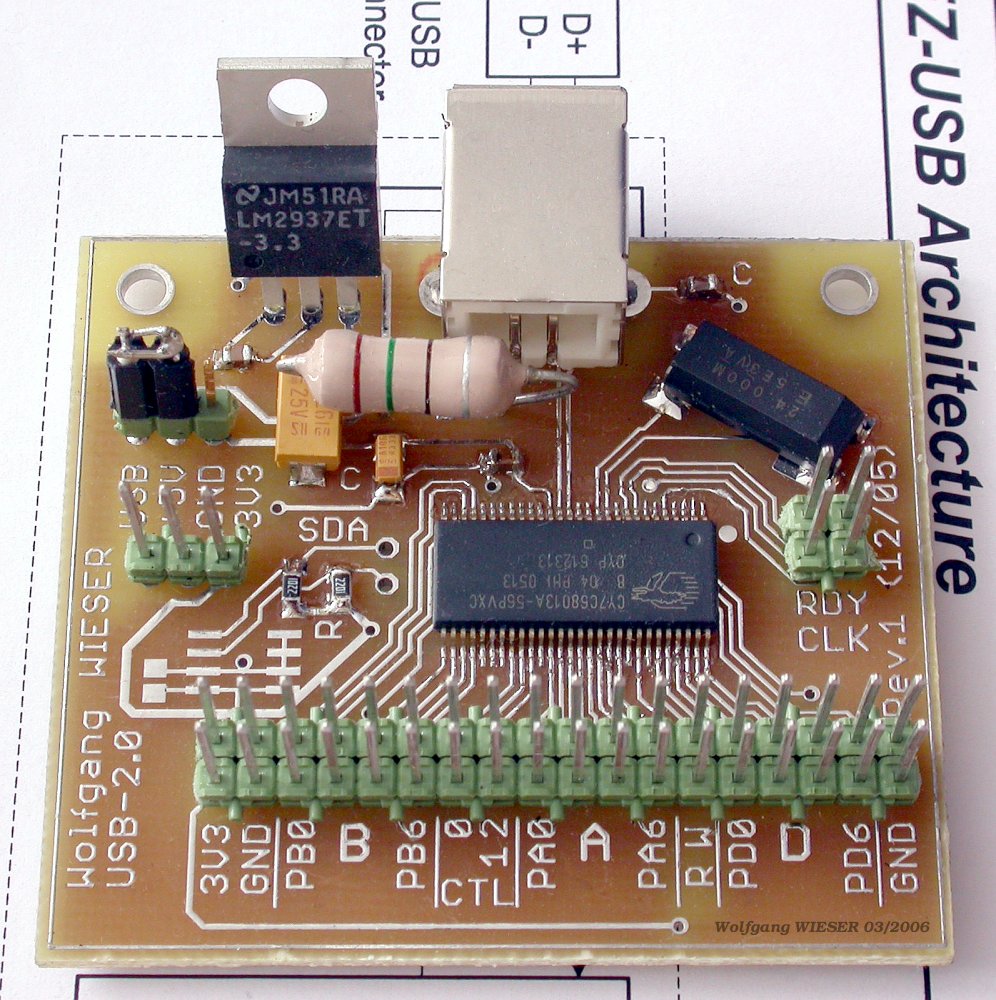
Note: Linux may load the usbtest kernel module as soon as you plug in an (unconfigured) FX2 board. You need to unload the module (using rmmod) so that the software above can get access to the USB device. Also note that the module is loaded again each time you re-plug the board, for what reason ever (including a quick accidental power short circuit).
If you see an error like Failed to claim interface 0, most likely you did not unload the usbtest kernel module.
If you get access restriction problems, remember that you have to be root and not an unprivileged user.
USB Resets: If you see slow data transfer and/or lots of USB bus resets (syslog!), or errors that the device is not accepting a certain address (syslog!) you probably have trouble with signal transmission. Most likely reasons include:
- Your FX2 board is poorely designed or soldered. (In case of address rejection errors, it probably is not even responding at all.)
- The USB cable is too long or of bad quality.
-
You are using a very cheap USB-2.0 PCI expansion card. On-board PCI host
controllers (integrated into the chipset) and quality USB-2.0 expansion cards
work better; test this with other USB high speed hardware.
I actually made bad experience with two such cheap 4-port USB-2.0 PCI expansion cards from ebay. Both these cards showed the above behaviour when connected to USB memory sticks or USB hard drives which worked fine with on-board controllers (VIA, Intel) as well as with my new quality USB-2.0 PCI card...
| [home] [site map] [Impressum] [Datenschutz/privacy policy] |

|
|